Security
Authentication
Gravitino supports two kinds of authentication mechanisms: simple and OAuth.
Simple mode
Simple mode is the default authentication option.
Simple mode allows the client to use the environment variable GRAVITINO_USER as the user.
If the environment variable GRAVITINO_USER isn't set, the client uses the user of the machine that sends requests.
For the client side, users can enable simple mode by the following code:
GravitinoClient client = GravitinoClient.builder(uri)
    .withMetalake("metalake")
    .withSimpleAuth()
    .build();
OAuth mode
Gravitino only supports external OAuth 2.0 servers.
First, users need to guarantee that the external correctly configured OAuth 2.0 server supports Bearer JWT.
Then, on the server side, users should set gravitino.authenticator as oauth and give
gravitino.authenticator.oauth.defaultSignKey, gravitino.authenticator.oauth.serverUri and
gravitino.authenticator.oauth.tokenPath a proper value.
Next, for the client side, users can enable OAuth mode by the following code:
DefaultOAuth2TokenProvider authDataProvider = DefaultOAuth2TokenProvider.builder()
    .withUri("oauth server uri")
    .withCredential("yy:xx")
    .withPath("oauth/token")
    .withScope("test")
    .build();

GravitinoClient client = GravitinoClient.builder(uri)
    .withMetalake("metalake")
    .withOAuth(authDataProvider)
    .build();
Kerberos mode
Gravitino supports Kerberos mode.
For the server side, users should set gravitino.authenticator as kerberos and give
gravitino.authenticator.kerberos.principal and gravitino.authenticator.kerberos.keytab a proper value.
For the client side, users can enable kerberos mode by the following code:
// Use keytab to create KerberosTokenProvider
KerberosTokenProvider provider = KerberosTokenProvider.builder()
        .withClientPrincipal(clientPrincipal)
        .withKeyTabFile(new File(keytabFile))
        .build();

// Use ticketCache to create KerberosTokenProvider
KerberosTokenProvider provider = KerberosTokenProvider.builder()
        .withClientPrincipal(clientPrincipal)
        .build();

GravitinoClient client = GravitinoClient.builder(uri)
    .withMetalake("metalake")
    .withKerberosAuth(provider)
    .build();
Now Iceberg REST service doesn't support Kerberos authentication. The URI must use the hostname of server instead of IP.
Server configuration
| Configuration item | Description | Default value | Required | Since version |
|---|---|---|---|---|
gravitino.authenticator | The authenticator which Gravitino uses, setting as simple,oauth or kerberos. | simple | No | 0.3.0 |
gravitino.authenticator.oauth.serviceAudience | The audience name when Gravitino uses OAuth as the authenticator. | GravitinoServer | No | 0.3.0 |
gravitino.authenticator.oauth.allowSkewSecs | The JWT allows skew seconds when Gravitino uses OAuth as the authenticator. | 0 | No | 0.3.0 |
gravitino.authenticator.oauth.defaultSignKey | The signing key of JWT when Gravitino uses OAuth as the authenticator. | (none) | Yes if use oauth as the authenticator | 0.3.0 |
gravitino.authenticator.oauth.signAlgorithmType | The signature algorithm when Gravitino uses OAuth as the authenticator. | RS256 | No | 0.3.0 |
gravitino.authenticator.oauth.serverUri | The URI of the default OAuth server. | (none) | Yes if use oauth as the authenticator | 0.3.0 |
gravitino.authenticator.oauth.tokenPath | The path for token of the default OAuth server. | (none) | Yes if use oauth as the authenticator | 0.3.0 |
gravitino.authenticator.kerberos.principal | Indicates the Kerberos principal to be used for HTTP endpoint. Principal should start with HTTP/. | (none) | Yes if use kerberos as the authenticator | 0.4.0 |
gravitino.authenticator.kerberos.keytab | Location of the keytab file with the credentials for the principal. | (none) | Yes if use kerberos as the authenticator | 0.4.0 |
The signature algorithms that Gravitino supports follows:
| Name | Description |
|---|---|
| HS256 | HMAC using SHA-25A |
| HS384 | HMAC using SHA-384 |
| HS512 | HMAC using SHA-51 |
| RS256 | RSASSA-PKCS-v1_5 using SHA-256 |
| RS384 | RSASSA-PKCS-v1_5 using SHA-384 |
| RS512 | RSASSA-PKCS-v1_5 using SHA-512 |
| ES256 | ECDSA using P-256 and SHA-256 |
| ES384 | ECDSA using P-384 and SHA-384 |
| ES512 | ECDSA using P-521 and SHA-512 |
| PS256 | RSASSA-PSS using SHA-256 and MGF1 with SHA-256 |
| PS384 | RSASSA-PSS using SHA-384 and MGF1 with SHA-384 |
| PS512 | RSASSA-PSS using SHA-512 and MGF1 with SHA-512 |
Example
You can follow the steps to set up an OAuth mode Gravitino server.
-
Prerequisite
You need to install the JDK8 and Docker.
-
Set up an external OAuth 2.0 server
There is a sample-authorization-server based on spring-authorization-server.
The image has registered client information in the external OAuth 2.0 server.
Its clientId is
test. Its secret istest. Its scope istest.
docker run -p 8177:8177 --name sample-auth-server -d datastrato/sample-authorization-server:0.3.0
-
Open the JWK URL of the Authorization server in the browser and you can get the JWK.

-
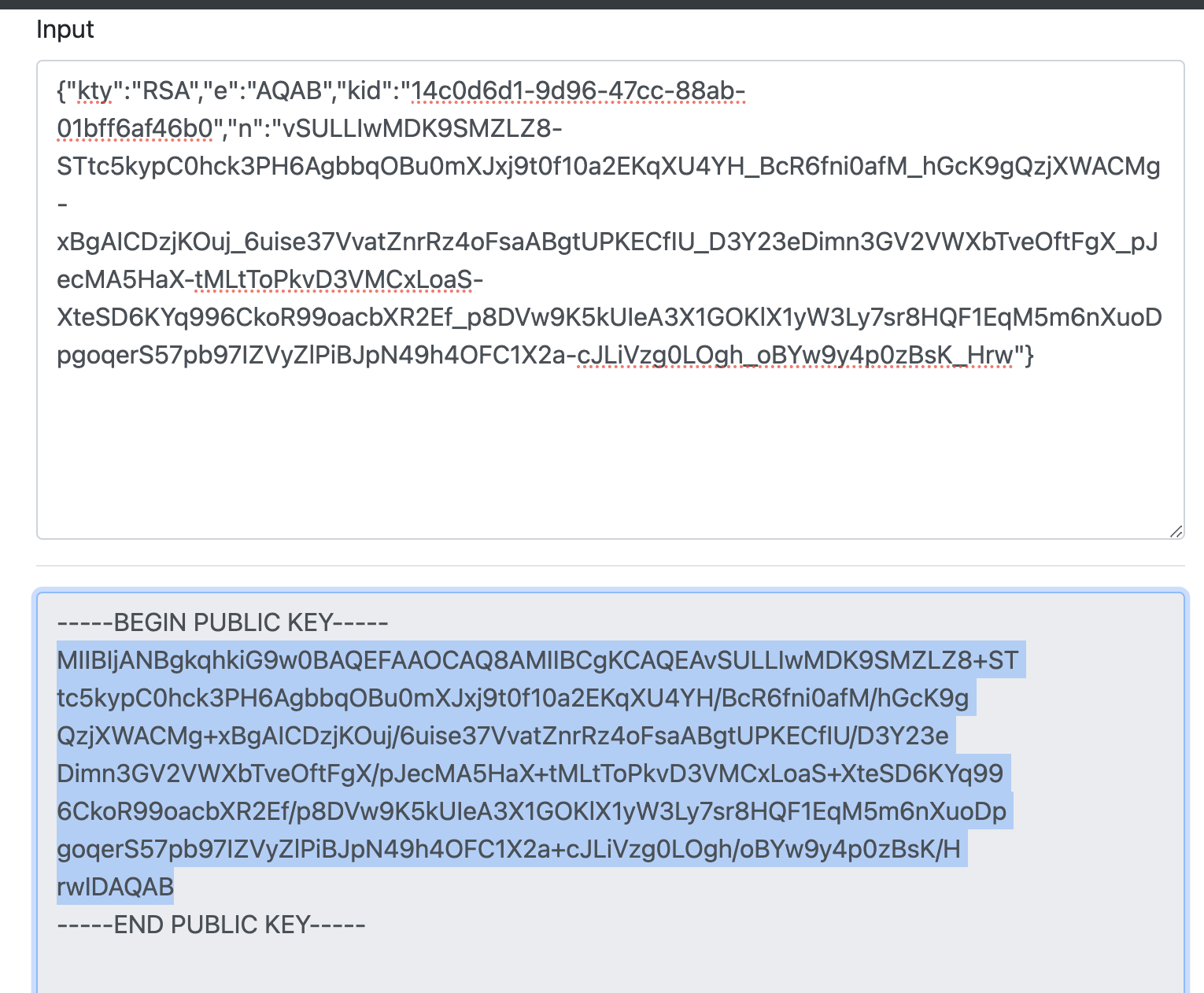
Convert the JWK to PEM. You can use the online tool or other tools.
-
Copy the public key and remove the character
\nand you can get the default signing key of Gravitino server. -
You can refer to the Configurations and append the configurations to the conf/gravitino.conf.
gravitino.authenticator = oauth
gravitino.authenticator.oauth.serviceAudience = test
gravitino.authenticator.oauth.defaultSignKey = <the default signing key>
gravitino.authenticator.oauth.tokenPath = /oauth2/token
gravitino.authenticator.oauth.serverUri = http://localhost:8177
-
Open the URL of Gravitino server and login in with clientId
test, clientSecrettest, and scopetest.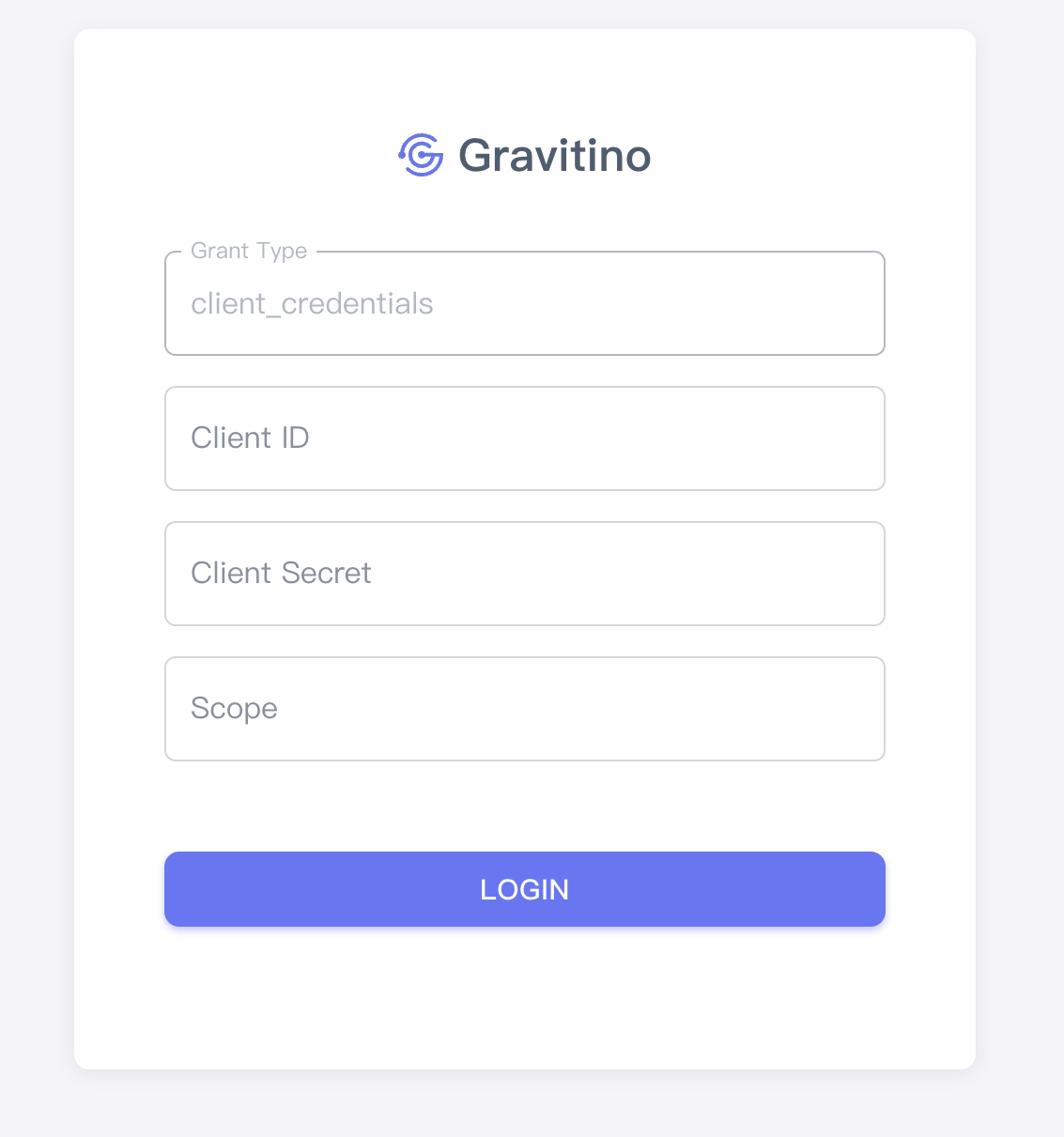
-
You can also use the curl command to access Gravitino.
Get access token
curl --location --request POST 'http://127.0.0.1:8177/oauth2/token?grant_type=client_credentials&client_id=test&client_secret=test&scope=test'
Use the access token to request the Gravitino
curl -v -X GET -H "Accept: application/vnd.gravitino.v1+json" -H "Content-Type: application/json" -H "Authorization: Bearer <access_token>" http://localhost:8090/api/version
HTTPS
Users would better use HTTPS instead of HTTP if users choose OAuth 2.0 as the authenticator.
HTTPS protects the header of the request from smuggling, making it safer.
If users choose to enable HTTPS, Gravitino won't provide the ability of HTTP service.
Both the Gravitino server and Iceberg REST service can configure HTTPS.
Gravitino server's configuration
| Configuration item | Description | Default value | Required | Since version |
|---|---|---|---|---|
gravitino.server.webserver.enableHttps | Enables HTTPS. | false | No | 0.3.0 |
gravitino.server.webserver.httpsPort | The HTTPS port number of the Jetty web server. | 8433 | No | 0.3.0 |
gravitino.server.webserver.keyStorePath | Path to the key store file. | (none) | Yes if use HTTPS | 0.3.0 |
gravitino.server.webserver.keyStorePassword | Password to the key store. | (none) | Yes if use HTTPS | 0.3.0 |
gravitino.server.webserver.keyStoreType | The type to the key store. | JKS | No | 0.3.0 |
gravitino.server.webserver.managerPassword | Manager password to the key store. | (none) | Yes if use HTTPS | 0.3.0 |
gravitino.server.webserver.tlsProtocol | TLS protocol to use. The JVM must support the TLS protocol to use. | (none) | No | 0.3.0 |
gravitino.server.webserver.enableCipherAlgorithms | The collection of enabled cipher algorithms. | `` | No | 0.3.0 |
gravitino.server.webserver.enableClientAuth | Enables the authentication of the client. | false | No | 0.3.0 |
gravitino.server.webserver.trustStorePath | Path to the trust store file. | (none) | Yes if use HTTPS and the authentication of client | 0.3.0 |
gravitino.server.webserver.trustStorePassword | Password to the trust store. | (none) | Yes if use HTTPS and the authentication of client | 0.3.0 |
gravitino.server.webserver.trustStoreType | The type to the trust store. | JKS | No | 0.3.0 |
Iceberg REST service's configuration
| Configuration item | Description | Default value | Required | Since version |
|---|---|---|---|---|
gravitino.auxService.iceberg-rest.enableHttps | Enables HTTPS. | false | No | 0.3.0 |
gravitino.auxService.iceberg-rest.httpsPort | The HTTPS port number of the Jetty web server. | 9433 | No | 0.3.0 |
gravitino.auxService.iceberg-rest.keyStorePath | Path to the key store file. | (none) | Yes if use HTTPS | 0.3.0 |
gravitino.auxService.iceberg-rest.keyStorePassword | Password to the key store. | (none) | Yes if use HTTPS | 0.3.0 |
gravitino.auxService.iceberg-rest.keyStoreType | The type to the key store. | JKS | No | 0.3.0 |
gravitino.auxService.iceberg-rest.managerPassword | Manager password to the key store. | (none) | Yes if use HTTPS | 0.3.0 |
gravitino.auxService.iceberg-rest.tlsProtocol | TLS protocol to use. The JVM must support the TLS protocol to use. | (none) | No | 0.3.0 |
gravitino.auxService.iceberg-rest.enableCipherAlgorithms | The collection of enabled cipher algorithms. | `` | No | 0.3.0 |
gravitino.auxService.iceberg-rest.enableClientAuth | Enables the authentication of the client. | false | No | 0.3.0 |
gravitino.auxService.iceberg-rest.trustStorePath | Path to the trust store file. | (none) | Yes if use HTTPS and the authentication of client | 0.3.0 |
gravitino.auxService.iceberg-rest.trustStorePassword | Password to the trust store. | (none) | Yes if use HTTPS and the authentication of client | 0.3.0 |
gravitino.auxService.iceberg-rest.trustStoreType | The type to the trust store. | JKS | No | 0.3.0 |
Refer to the "Additional JSSE Standard Names" section of the Java security guide for the list of protocols related to tlsProtocol. You can find the list of tlsProtocol values for Java 8 in this document.
Refer to the "Additional JSSE Standard Names" section of the Java security guide for the list of protocols related to tlsProtocol. You can find the list of enableCipherAlgorithms values for Java 8 in this document.
Example
You can follow the steps to set up a HTTPS server.
-
Prerequisite
You need to install the JDK8, wget, and set the environment JAVA_HOME.
If you want to use the command
curlto request the Gravitino server, you should install openSSL. -
Generate the key store
cd $JAVA_HOME
bin/keytool -genkeypair  -alias localhost \
-keyalg RSA -keysize 4096 -keypass localhost \
-sigalg SHA256withRSA \
-keystore localhost.jks -storetype JKS -storepass localhost \
-dname "cn=localhost,ou=localhost,o=localhost,l=beijing,st=beijing,c=cn" \
-validity 36500
- Generate the certificate
bin/keytool -export -alias localhost -keystore localhost.jks -file localhost.crt -storepass localhost
- Import the certificate
bin/keytool -import -alias localhost -keystore jre/lib/security/cacerts -file localhost.crt -storepass changeit -noprompt
- You can refer to the Configurations and append the configuration to the conf/gravitino.conf.
Configuration doesn't support resolving environment variables, so you should replace
${JAVA_HOME}with the actual value. Then, You can start the Gravitino server.
gravitino.server.webserver.host = localhost
gravitino.server.webserver.enableHttps = true
gravitino.server.webserver.keyStorePath = ${JAVA_HOME}/localhost.jks
gravitino.server.webserver.keyStorePassword = localhost
gravitino.server.webserver.managerPassword = localhost
-
Request the Gravitino server
If you use Java, you can follow the steps
Copy the code to a file named Main.java
import com.datastrato.gravitino.client.GravitinoClient;
import com.datastrato.gravitino.client.GravitinoVersion;

public class Main {
    public static void main(String[] args) {
        String uri = "https://localhost:8433";
        GravitinoClient client = GravitinoClient.builder(uri).withMetalake("metalake").build();
        GravitinoVersion gravitinoVersion = client.getVersion();
        System.out.println(gravitinoVersion);
    }
}
If you want to use the command curl, you can follow the commands:
openssl x509 -inform der -in $JAVA_HOME/localhost.crt -out certificate.pem
curl -v -X GET --cacert ./certificate.pem -H "Accept: application/vnd.gravitino.v1+json" -H "Content-Type: application/json" https://localhost:8433/api/version
Cross-origin resource filter
Server configuration
| Configuration item | Description | Default value | Required | Since version |
|---|---|---|---|---|
gravitino.server.webserver.enableCorsFilter | Enable cross-origin resource share filter. | false | No | 0.4.0 |
gravitino.server.webserver.allowedOrigins | A comma separated list of allowed origins to access the resources. The default value is *, which means all origins. | * | No | 0.4.0 |
gravitino.server.webserver.allowedTimingOrigins | A comma separated list of allowed origins to time the resource. The default value is the empty string, which means no origins. | `` | No | 0.4.0 |
gravitino.server.webserver.allowedMethods | A comma separated list of allowed HTTP methods used when accessing the resources. The default values are GET, POST, HEAD, and DELETE. | GET,POST,HEAD,DELETE,PUT | No | 0.4.0 |
gravitino.server.webserver.allowedHeaders | A comma separated list of allowed HTTP headers specified when accessing the resources. The default value is X-Requested-With,Content-Type,Accept,Origin. If the value is a single *, it accepts all headers. | X-Requested-With,Content-Type,Accept,Origin | No | 0.4.0 |
gravitino.server.webserver.preflightMaxAgeInSecs | The number of seconds to cache preflight requests by the client. The default value is 1800 seconds or 30 minutes. | 1800 | No | 0.4.0 |
gravitino.server.webserver.allowCredentials | A boolean indicating if the resource allows requests with credentials. The default value is true. | true | No | 0.4.0 |
gravitino.server.webserver.exposedHeaders | A comma separated list of allowed HTTP headers exposed on the client. The default value is the empty list. | `` | No | 0.4.0 |
gravitino.server.webserver.chainPreflight | If true chained preflight requests for normal handling (as an OPTION request). Otherwise, the filter responds to the preflight. The default is true. | true | No | 0.4.0 |
Iceberg REST service's configuration
| Configuration item | Description | Default value | Required | Since version |
|---|---|---|---|---|
gravitino.auxService.iceberg-rest.enableCorsFilter | Enable cross-origin resource share filter. | false | No | 0.4.0 |
gravitino.auxService.iceberg-rest.allowedOrigins | A comma separated list of allowed origins that access the resources. The default value is *, which means all origins. | * | No | 0.4.0 |
gravitino.auxService.iceberg-rest.allowedTimingOrigins | A comma separated list of allowed origins that time the resource. The default value is the empty string, which means no origins. | `` | No | 0.4.0 |
gravitino.auxService.iceberg-rest.allowedMethods | A comma separated list of allowed HTTP methods used when accessing the resources. The default values are GET, POST, HEAD, and DELETE. | GET,POST,HEAD,DELETE,PUT | No | 0.4.0 |
gravitino.auxService.iceberg-rest.allowedHeaders | A comma separated list of HTTP allowed headers specified when accessing the resources. The default value is X-Requested-With,Content-Type,Accept,Origin. If the value is a single *, it accepts all headers. | X-Requested-With,Content-Type,Accept,Origin | No | 0.4.0 |
gravitino.auxService.iceberg-rest.preflightMaxAgeInSecs | The number of seconds to cache preflight requests by the client. The default value is 1800 seconds or 30 minutes. | 1800 | No | 0.4.0 |
gravitino.auxService.iceberg-rest.allowCredentials | A boolean indicating if the resource allows requests with credentials. The default value is true. | true | No | 0.4.0 |
gravitino.auxService.iceberg-rest.exposedHeaders | A comma separated list of allowed HTTP headers exposed on the client. The default value is the empty list. | `` | No | 0.4.0 |
gravitino.auxService.iceberg-rest.chainPreflight | If true chained preflight requests for normal handling (as an OPTION request). Otherwise, the filter responds to the preflight. The default is true. | true | No | 0.4.0 |