How Iceberg works
Apache Iceberg is an open table format. An Iceberg table is a set of data files in object storage plus metadata files that say which data files make up the table, and a catalog that says which metadata file is current. Every engine that reads the table follows the same files, so Trino, Spark, Flink and DuckDB see the same rows, the same history and the same schema.
The page covers how the format behaves: how a table is laid out, what a snapshot is, how concurrent writers commit without locking, how time travel and rollback work, how rows are deleted, what each table maintenance job does, and how views are stored and shared between engines. Defining a table, with its format version, column types, partitioning and properties, is covered in Iceberg tables.
Quick start
The example runs in Trino, connected to the Iceberg REST service as the
catalog gravitino_irc as described in Trino and Starburst. It
commits to a table three times, reads its snapshots, queries an earlier one, and rolls the table back.
-
Create a table and change its data three times. Each insert or delete is one commit and adds one snapshot.
Create a table, insert twice, delete onceCREATE SCHEMA IF NOT EXISTS gravitino_irc.sales;
CREATE TABLE gravitino_irc.sales.orders (
id BIGINT,
customer VARCHAR,
amount DOUBLE
);
INSERT INTO gravitino_irc.sales.orders VALUES (1, 'acme', 100.0), (2, 'globex', 250.0);
INSERT INTO gravitino_irc.sales.orders VALUES (3, 'initech', 75.0);
DELETE FROM gravitino_irc.sales.orders WHERE id = 2; -
List the snapshots. The
$snapshotsmetadata table has one row per commit.List the table's snapshotsSELECT snapshot_id, parent_id, committed_at, operation
FROM gravitino_irc.sales."orders$snapshots"
ORDER BY committed_at; -
Query the table as it was before the delete. Use the snapshot ID of the second insert. The query returns three rows, including
globex, and the table itself is unchanged.Time travel to an earlier snapshotSELECT * FROM gravitino_irc.sales.orders FOR VERSION AS OF {second_snapshot_id}; -
Roll the table back to that snapshot. The delete is undone for every reader.
Roll back to an earlier snapshotALTER TABLE gravitino_irc.sales.orders EXECUTE rollback_to_snapshot({second_snapshot_id});
Table structure
An Iceberg table has three layers. The catalog holds the table's name and a pointer to its current metadata file. Everything below the pointer is files in object storage that engines write and read directly.

| File | Holds |
|---|---|
| Metadata file | The schema, the partition spec, the table properties, and every snapshot the table still keeps |
| Manifest list | One per snapshot: the manifests that make up that snapshot, with the partition range each one covers |
| Manifest | A list of data files and delete files, with each file's partition, row count and column bounds |
| Data file | Rows, usually in Parquet |
Datastrato Enterprise is the catalog in this picture. On top of holding the pointer, it decides who may reach each table, vends storage credentials scoped to it, applies tags and policies, and compacts it on request. Everything about the table's contents, from time travel to row-level deletes, is the format's own and works the same in every engine that reads it.
The column bounds in manifests let an engine skip files before opening them: a query for
amount > 1000 never reads a file whose largest amount is 500. Engines plan a query from metadata
alone and do not list directories in storage.
Snapshots
Every commit writes a new metadata file. A commit that changes data, such as an insert, delete or update, also adds a snapshot. A snapshot is the complete state of the table at that commit: the full list of files a reader should read. It records its parent, so the snapshots form the table's history.

Data files are never changed in place. A commit writes new files and builds a new snapshot that references them along with the unchanged files it keeps, so consecutive snapshots share most of their files. A file that a newer snapshot no longer references stays in storage as long as an older snapshot still does, which is what makes time travel possible and why storage grows until old snapshots are expired.
Each engine exposes a table's metadata as tables of their own:
| Metadata table | Lists | Trino | Spark |
|---|---|---|---|
| Snapshots | Every snapshot the table keeps | "orders$snapshots" | orders.snapshots |
| History | Which snapshot was current when, including rollbacks | "orders$history" | orders.history |
| Files | The data and delete files of the current snapshot | "orders$files" | orders.files |
| Manifests | The manifests of the current snapshot | "orders$manifests" | orders.manifests |
Commits and concurrency
Iceberg uses optimistic concurrency. A writer takes no lock while it works: it reads the current metadata, writes its data files and a new metadata file, and only then asks the catalog to commit. The commit asks the catalog to swap the table's pointer from the metadata file the writer started from to the new one, and the catalog makes the swap only if the pointer has not moved in the meantime.

When two writers commit at once, the first commit wins and the second is refused; the Iceberg REST
service refuses it with 409. The losing writer reads the new current state, checks whether its
change still applies, and if so writes a new metadata file on top and commits again. Its data files
are reused, so the retry is cheap. Two inserts never conflict. A delete or update conflicts when the
other commit changed or added data where it was working, and then the losing statement fails with an
error rather than overwriting the other writer's work.
Writers retry four times by default, set by the table property commit.retry.num-retries. Readers
never wait for writers: a query reads the snapshot that was current when it started, and a commit that
lands during the query does not change what the query sees.
Each commit covers one table. A change to several tables cannot be committed as one.
Time travel and rollback
Because each snapshot is a complete table state, an engine can read any snapshot the table still keeps. Time travel reads an older snapshot and changes nothing. Rollback makes an older snapshot current again: the catalog's pointer moves back, and every reader sees the older state.

| Operation | Trino | Spark |
|---|---|---|
| Read a snapshot | SELECT * FROM orders FOR VERSION AS OF {snapshot_id} | SELECT * FROM orders VERSION AS OF {snapshot_id} |
| Read the table at a time | SELECT * FROM orders FOR TIMESTAMP AS OF TIMESTAMP '{timestamp} UTC' | SELECT * FROM orders TIMESTAMP AS OF '{timestamp}' |
| Roll back | ALTER TABLE orders EXECUTE rollback_to_snapshot({snapshot_id}) | CALL {catalog}.system.rollback_to_snapshot('{schema}.orders', {snapshot_id}) |
The snapshots after the one rolled back to are not deleted. They stay until they are expired, so a
rollback can itself be undone, in Spark with the set_current_snapshot procedure.
Time travel reaches only snapshots that have not been expired. To keep a particular snapshot readable past the expiry window, give it a tag, a named reference that expiry leaves alone. Creating one needs the Iceberg Spark SQL extensions:
ALTER TABLE {catalog}.{schema}.orders CREATE TAG year_end_2026 AS OF VERSION {snapshot_id} RETAIN 365 DAYS;
Trino reads a tag by name with FOR VERSION AS OF 'year_end_2026'. A branch is the same idea for
writes: a named line of snapshots that can be written to without changing what the main table shows.
Row-level deletes and updates
A delete, update or merge that touches some rows of a data file is written one of two ways.

- Copy-on-write. The engine rewrites every data file that holds an affected row. Writes cost more, because a one-row delete rewrites the whole file, and reads cost nothing extra.
- Merge-on-read. The engine leaves the data files alone and writes small delete files that mark rows as deleted. Writes are cheap, and every read merges the delete files into the data it reads until compaction folds them in.
Spark uses copy-on-write by default and switches per table with the properties write.delete.mode,
write.update.mode and write.merge.mode. Trino always uses merge-on-read. Delete files come in
three kinds: position deletes, which name a file and row position; deletion vectors, the format
version 3 replacement for position deletes, which store the same information as a compact bitmap per
data file; and equality deletes, which delete every row matching a value and are written mostly by
streaming upserts from Flink.
Schema and partition evolution
Iceberg tracks columns by ID rather than by name or position. Adding, dropping, renaming or reordering a column, or widening its type, changes only the metadata file. No data file is rewritten, and old files still read correctly under the new schema.
Partitioning is hidden. A table is partitioned by a transform of a column, such as day(order_ts) or
bucket(16, customer_id), and queries filter on the column itself; the engine works out which
partitions to read. Changing the partition spec applies to new data only. Files written under the old
spec keep their layout, and a query reads both without the user knowing which is which.
Table maintenance
Commits leave work behind: small files from frequent writes, delete files from merge-on-read, one manifest per commit, and snapshots and files that pile up in storage. Four maintenance jobs clean it up.
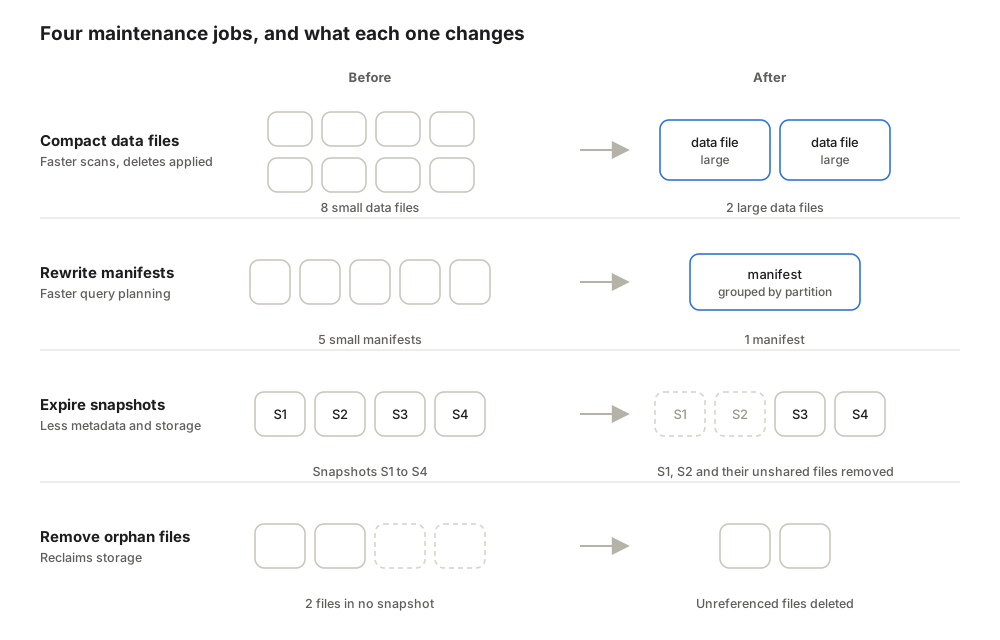
| Job | What it does | Trino | Spark |
|---|---|---|---|
| Compact data files | Merges small data files into files near the target size and applies delete files | EXECUTE optimize | rewrite_data_files |
| Rewrite manifests | Merges many small manifests into fewer, grouped by partition, so planning reads less metadata | EXECUTE optimize_manifests | rewrite_manifests |
| Expire snapshots | Removes snapshots older than a threshold, then deletes the files that only those snapshots used | EXECUTE expire_snapshots | expire_snapshots |
| Remove orphan files | Deletes files under the table's location that no snapshot references, such as from failed writes | EXECUTE remove_orphan_files | remove_orphan_files |
The Trino commands run as ALTER TABLE {table} EXECUTE ..., and the Spark procedures as
CALL {catalog}.system.{procedure}(table => '{schema}.{table}').
ALTER TABLE gravitino_irc.sales.orders EXECUTE optimize(file_size_threshold => '128MB');
ALTER TABLE gravitino_irc.sales.orders EXECUTE optimize_manifests;
ALTER TABLE gravitino_irc.sales.orders EXECUTE expire_snapshots(retention_threshold => '7d');
ALTER TABLE gravitino_irc.sales.orders EXECUTE remove_orphan_files(retention_threshold => '7d');
Expiring snapshots is what frees storage: until a snapshot is expired, every file it references stays.
Expiry also ends time travel to the expired snapshots, so the retention threshold is the time travel
window. Trino refuses a threshold below seven days unless the catalog properties
iceberg.expire-snapshots.min-retention and iceberg.remove-orphan-files.min-retention are lowered.
Spark defaults to expiring snapshots older than five days and keeping at least one.
Remove orphan files only with a threshold longer than any write can run. A file a running write has just created is in no snapshot yet. If it is removed, the write still commits a reference to it, and reads of the table then fail on the missing file.
Old metadata files accumulate too, one per commit. Set the table property
write.metadata.delete-after-commit.enabled to true to delete the oldest after each commit,
keeping the number set by write.metadata.previous-versions-max, which defaults to 100.
Datastrato Enterprise compacts data files for you with table maintenance. It does not rewrite manifests, expire snapshots or remove orphan files, so schedule those in an engine.
Views
An Iceberg view is a stored query that every engine reads through the catalog. Like a table, a view has a catalog pointer and a metadata file in object storage, but it has no data files: each read runs the query against the tables it names.
View structure
The catalog holds the view's name and a pointer to its current metadata file. The metadata file holds everything else.

| Part | Holds |
|---|---|
| Metadata file | The view's location, properties, schemas, and every version the view keeps |
| Version | One definition of the view: a schema, a default catalog and namespace, the engine that wrote it, and its representations |
| Representation | The query as SQL text, tagged with its dialect, such as trino or spark; a version holds at most one per dialect |
Every change to the view adds a version and makes it current, so a view keeps a history the way a table keeps snapshots. The schema in each version is the contract: every representation must return the column names and types it records.
Dialects
Iceberg stores the SQL as text and never translates it. Each engine looks for the representation in its own dialect, and the engines disagree about what to do when it is missing.
| Engine | Dialect it writes | When its own dialect is missing |
|---|---|---|
| Trino | trino | Rejects the query with ICEBERG_UNSUPPORTED_VIEW_DIALECT |
| Spark | spark | Runs the first representation it finds, written for another engine |
| DuckDB | duckdb | Tries to parse another representation, and fails on SELECT if it cannot |
A view created in Spark cannot be queried from Trino even when its SQL is identical, and a view created in Trino runs in Spark only when the text happens to parse there. Neither behavior is configurable. Flink does not yet read Iceberg views.
Spark's fallback carries a quieter risk than Trino's error. Text that parses in both engines can
still mean different things: array subscripts start at 0 in Spark and at 1 in Trino, so tags[1]
returns a different element in each, and the query succeeds in both.
Multi-dialect views
A view that every engine reads correctly carries one representation per engine. No engine's SQL can
add a representation for another engine, and CREATE OR REPLACE VIEW writes only the calling
engine's text. The Iceberg library refuses a replace that would drop an existing dialect unless the
view property replace.drop-dialect.allowed is true, so redefining a multi-dialect view from
Trino is rejected with an error rather than deleting the Spark text.
Write a multi-dialect view through the Iceberg API, passing every representation in one new version:
View view = catalog.loadView(TableIdentifier.of("sales", "daily_orders"));
ViewVersion current = view.currentVersion();

view.replaceVersion()
    .withQuery("trino", "SELECT order_date, count(*) AS orders FROM orders GROUP BY order_date")
    .withQuery("spark", "SELECT order_date, count(1) AS orders FROM orders GROUP BY order_date")
    .withSchema(view.schema())
    .withDefaultCatalog(current.defaultCatalog())
    .withDefaultNamespace(current.defaultNamespace())
    .commit();
Nothing checks that the representations return the same rows, so run each text in its own engine
against the same data before committing them. Name tables relative to the view's default namespace,
as above: a fully qualified name such as gravitino_irc.sales.orders resolves only in an engine
that registers the catalog under that same name.
Datastrato Enterprise authorizes a view read as the user running the query, so that user needs access to the view and to every table it reads.