
November 2026
Data platforms keep getting wider: more sources, more engines, more clouds, and more teams sharing one estate. Datastrato Enterprise is the commercial metadata platform built on Apache Gravitino™, the open-source project that unifies metadata across catalogs, clouds, and engines, and it is designed for that breadth. Datastrato is the original creator of Apache Gravitino.
What's new in Datastrato Enterprise 1.3
The 1.3.x line brings:
- A redesigned administration console that manages several tenants from one place
- Google BigQuery as a first-class catalog with Trino and Spark access
- New Oracle and SQL Server connectors
- Identity provisioning through SCIM
- Governed Lance tables for AI workloads
- Federation of Cloudflare R2 Data Catalog
- Scoped credential vending for more object stores
Datastrato Enterprise 1.3 is built on Apache Gravitino 1.3.1 and includes everything in it. Tags, policies, ownership, roles and privileges, the audit log and the Iceberg REST catalog come from the open-source project. Enterprise adds the administration console, the Oracle, SQL Server and BigQuery catalogs, SCIM provisioning, permission-filtered search, data preview, the bundled lineage service and a supported Helm chart. The Datastrato Enterprise docs list what Enterprise adds, and Apache Gravitino™ 1.3: Govern at the Source covers the open-source release.
The Datastrato Enterprise 1.3 console: organized around the work
The Datastrato Enterprise 1.3 console is rebuilt around the jobs a platform team does. Each section owns one kind of work, so finding a table, granting access to it and checking the health of the server no longer means hunting through one long menu.
Jeremy Goldberg, Head of Solutions Engineering at Datastrato, tours the console in five minutes.
Explore: browse and preview data across catalogs
Explore is where you find and understand data. Browse metalakes, catalogs, schemas, tables, views and functions in a tree beside a contents list, filter by tag, and drill into any object to see its columns, properties, tags, policies, owner and the role privileges that apply to it.
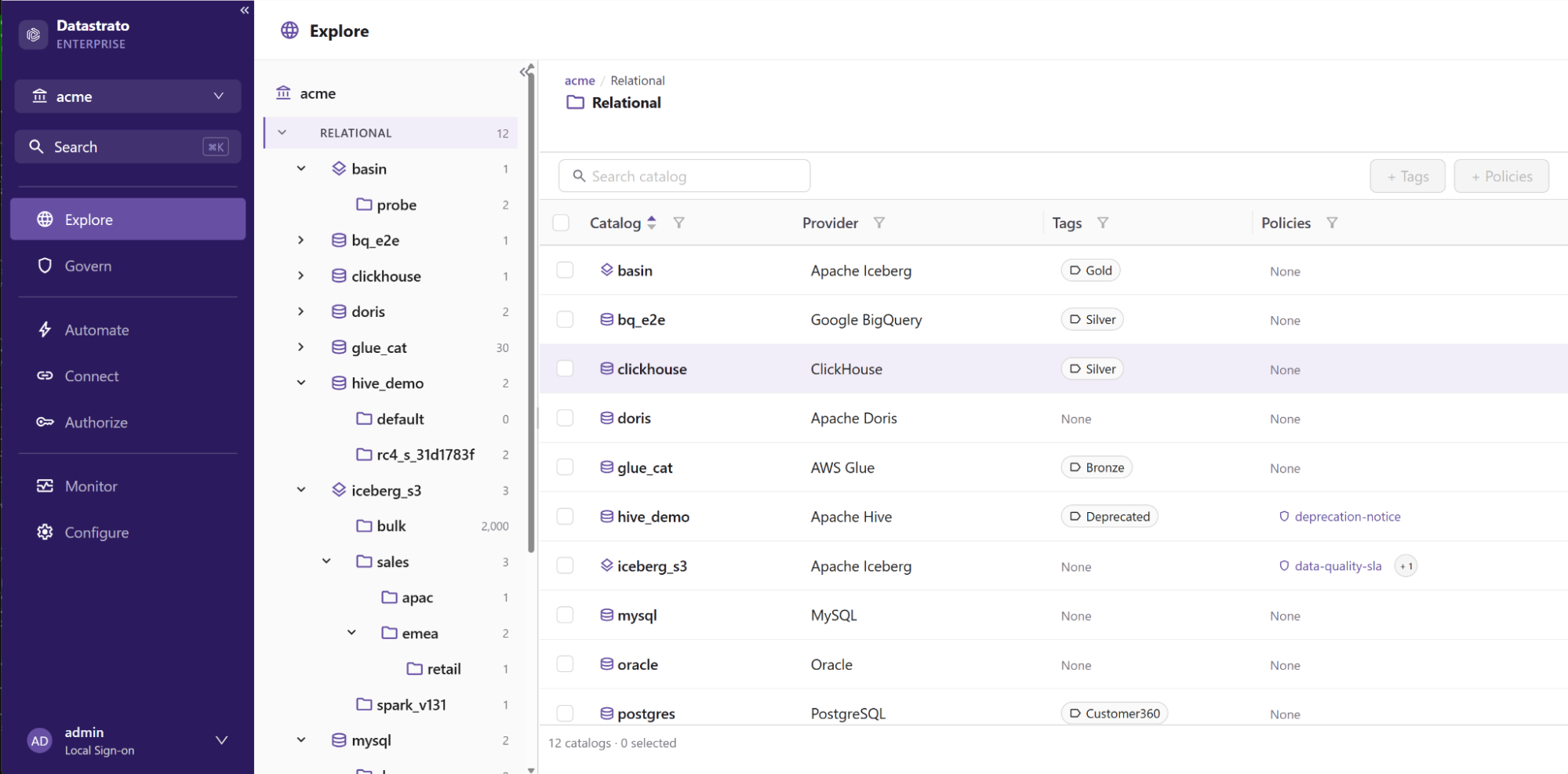
Explore: the relational catalogs in the acme metalake, each with its provider, tags and policies.
Data preview runs through your query engine to show a sample of rows from a table without leaving the console, and tags and policies can be associated with an object directly from its page.
Govern: tags, policies and lineage
Govern is the home for tags and policies. Define a tag or a policy once, then attach it at the catalog, schema or table level; anything attached to a parent applies to everything beneath it. The Govern overview shows how much of your estate carries tags and policies, catalog by catalog, so gaps in coverage are visible at a glance.
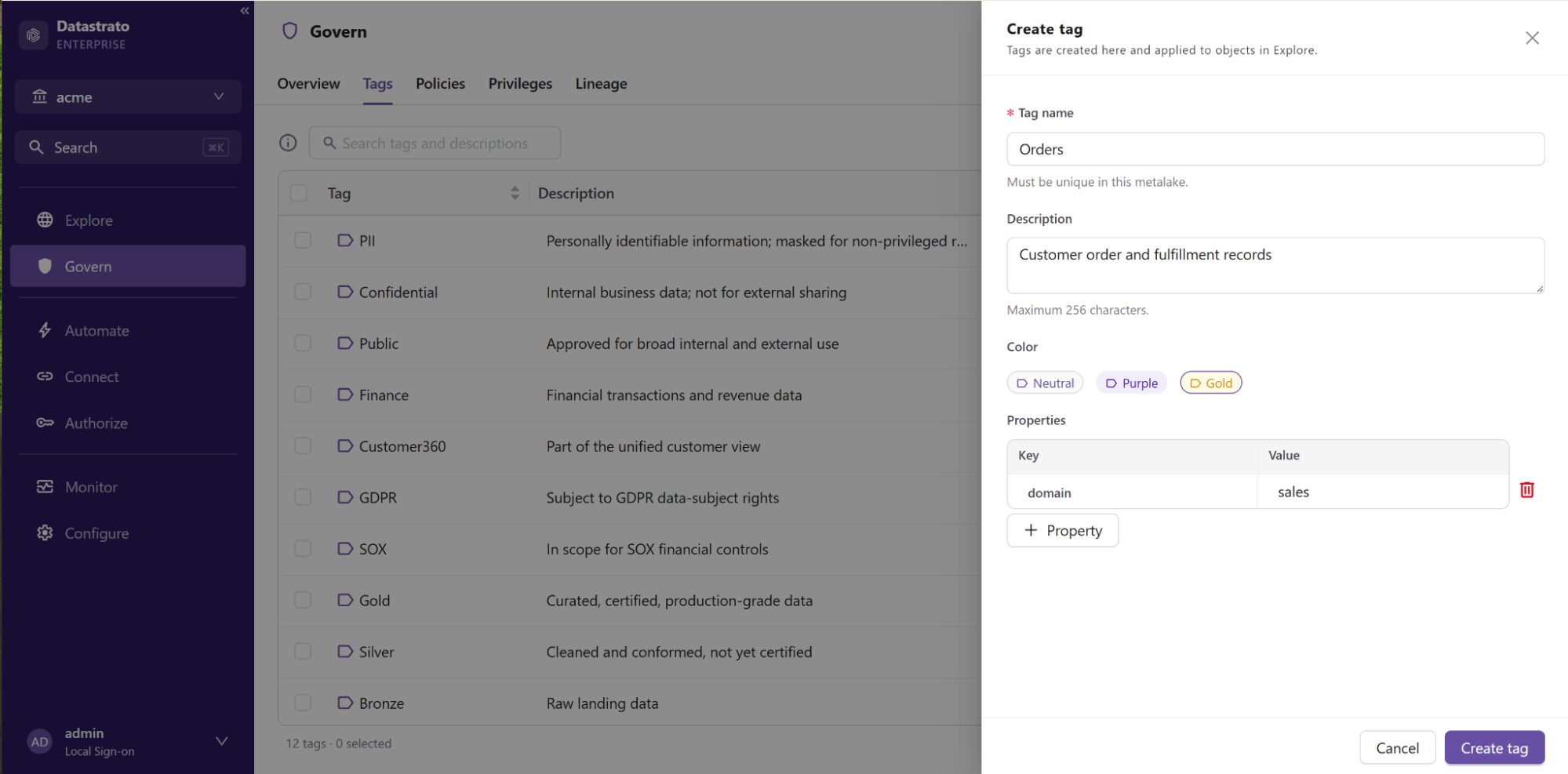
Govern: creating a tag from the Tags tab.
Govern also shows the privileges granted across the metalake and holds the lineage view.
Authorize: users, groups, roles and privileges
Authorize brings users, groups, roles and privilege grants into one place. Create a role, grant it privileges on catalogs, schemas and tables, and assign it to users or groups from the same screens.
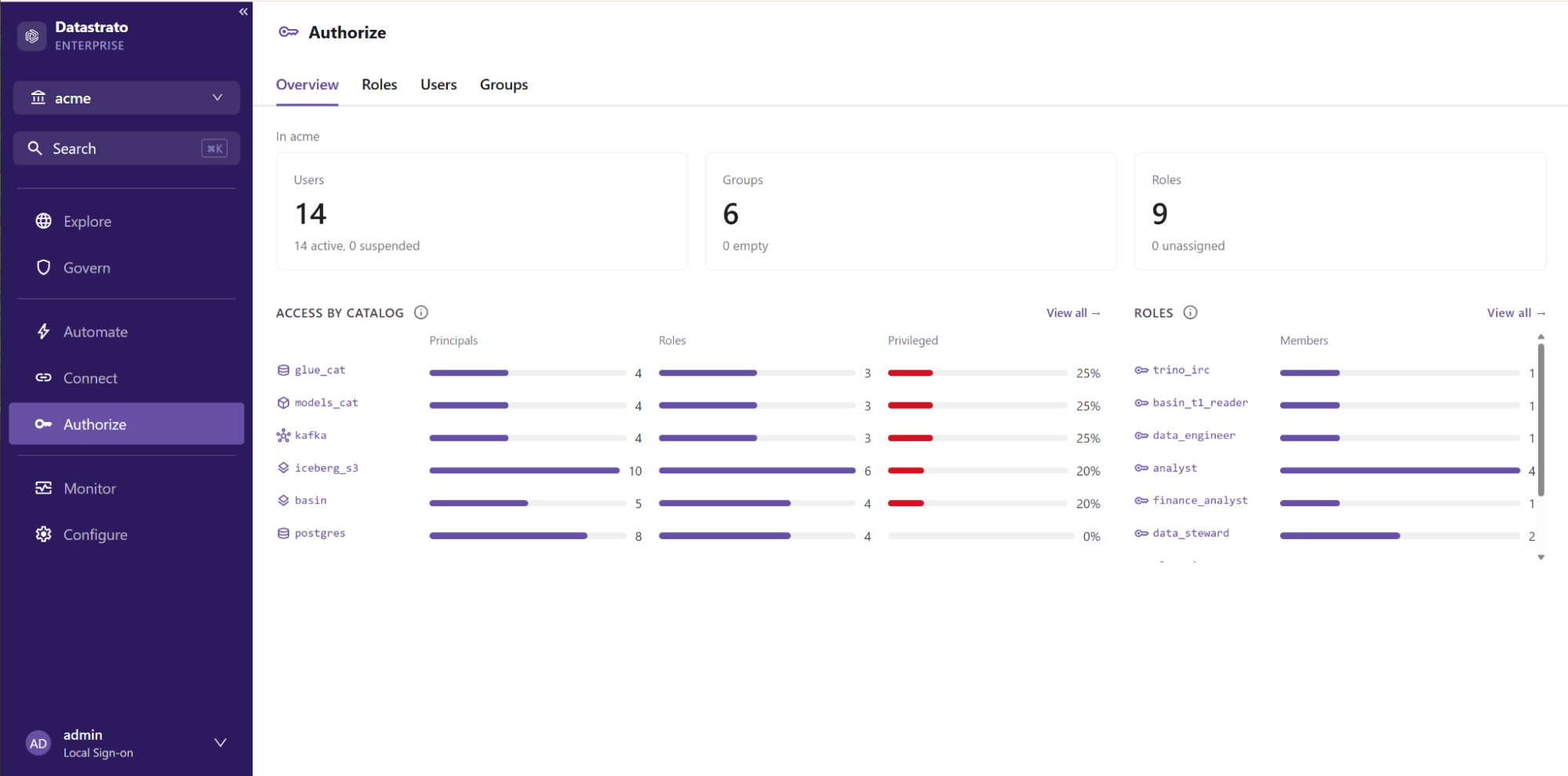
Authorize: users, groups and roles at a glance, with access by catalog.
Gravitino enforces these grants on every request: when Gravitino denies an operation, the request stops there and never reaches the underlying catalog or storage.
Connect: catalog connections and storage credentials
Connect is where you configure and manage catalog connections. The Add catalog drawer walks through provider, connection details and storage credentials, including credential vending settings for Iceberg catalogs. Existing connections are listed with their providers and properties, and sensitive values such as passwords and secret keys are masked when read back.
Automate: job templates and job runs
Automate shows job templates and job runs across the metalake, with recent runs, failures and completions on its overview.
Monitor: server health and latency
Monitor gives operators a live view of the server. For each service (the Gravitino API, the Iceberg REST catalog and the Lance REST service) it shows request rate, p95 latency, the slowest operation and thread pool load, alongside JVM heap, metadata store connections and recent server errors.
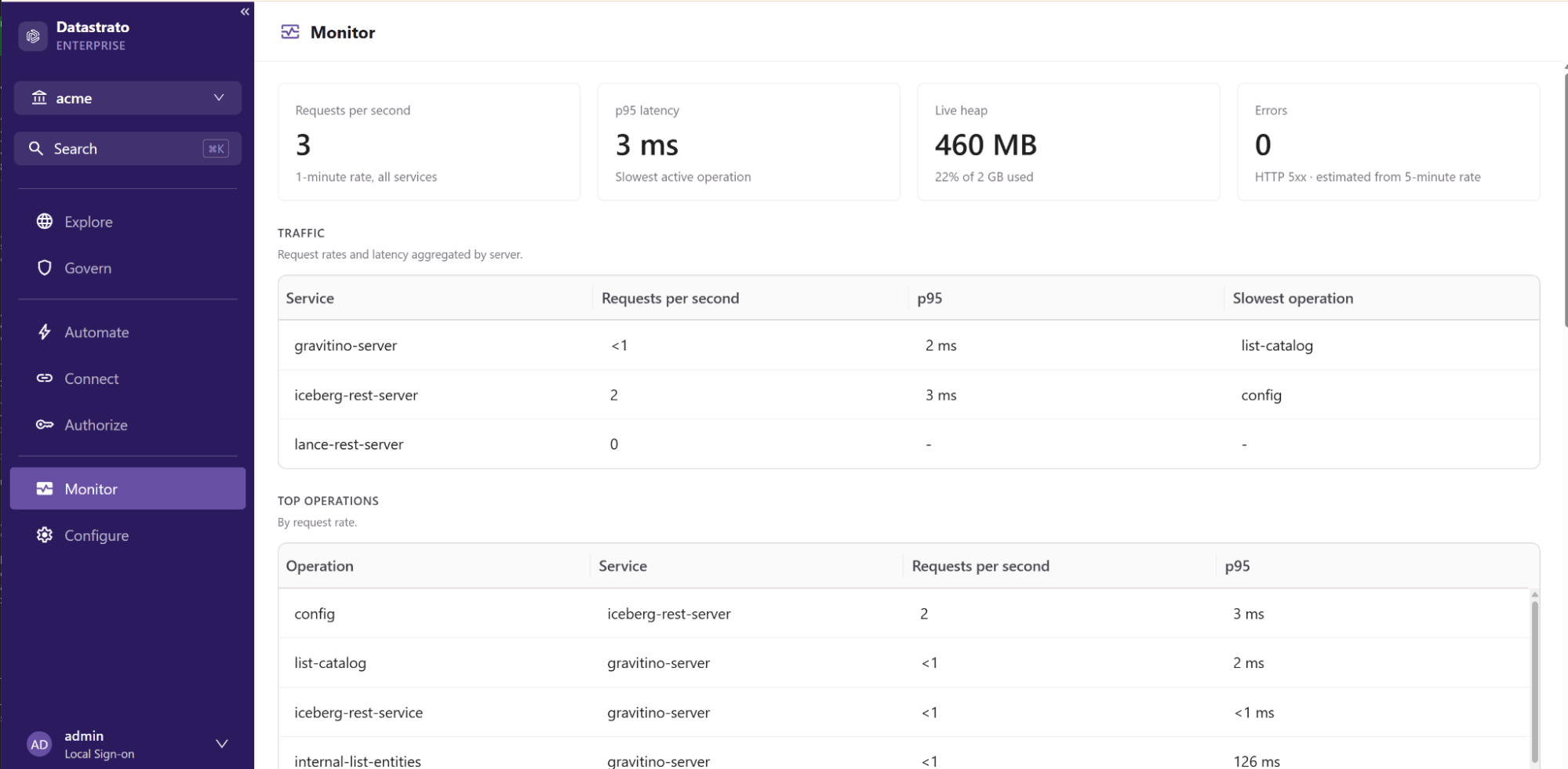
Monitor: request rate, p95 latency, heap and errors, broken out by service and operation.
When something slows down, Monitor shows which service and which operation.
Configure: directory, events, server settings and client access
Configure holds the settings that apply to the whole server. Directory lists the users and groups that sign-in and SCIM bring in. Events manages event listeners, Server settings shows the running configuration grouped by service (server, Iceberg REST, Lance REST, entity store and security), and Client access gives ready-to-copy connection settings for Trino, Spark, Flink, Python and Java clients.
Multi-tenancy: one metalake per tenant
A metalake is a self-contained tenant: its own catalogs, tags, policies, roles and grants. An enterprise that runs several business units, regions or teams on one deployment can give each its own metalake and manage all of them from a single console, switching between them with the metalake selector at the top of the page.
Each user sees and selects only the metalakes they belong to, rather than every tenant on the server. Admission is automatic: define a role in a metalake and grant it to a user or group, and that user is admitted to the metalake with no separate membership step. Users and groups come from one directory, kept current by SCIM, and a user can belong to as many metalakes as their roles allow.
New catalog connectors: Oracle, SQL Server and Google BigQuery
Datastrato Enterprise 1.3 adds three sources to the federated catalog, each configured from Connect and governed under the same tags, policies and privileges as everything else.
Oracle and Microsoft SQL Server catalogs
Oracle and SQL Server join the catalog as JDBC sources. Schemas, tables and column types are read from the source database and governed in Gravitino alongside your lakehouse tables, and both are queryable through the Gravitino Trino, Spark and Flink connectors.
Google BigQuery catalog for Trino and Spark
BigQuery is now a first-class catalog, with metadata managed in Gravitino and data reachable from both Trino and Spark.
- Full metadata management. List, create, alter and drop datasets and tables through Gravitino with BigQuery's own semantics. Dataset options such as default table expiration and collation can be set and removed, listings page through every dataset and table, and table and column names follow BigQuery's rules, including dashes, spaces and non-ASCII characters. A table alter that combines several kinds of change is grouped into the fewest statements BigQuery can run.
- Query from Trino. The Gravitino Trino connector now registers BigQuery catalogs through Trino's native BigQuery connector. Names, comments and nullability come from Gravitino, while column types come from BigQuery itself, so Trino sees exact types: nested array(row(...)) structures, JSON and microsecond-precision time. SHOW, DESCRIBE, SELECT, INSERT, CREATE TABLE AS SELECT and DROP all work, with values round-tripping exactly.
- Read and write from Spark. The Gravitino Spark connector keeps metadata operations in Gravitino and hands reads and writes to Google's Spark BigQuery connector, which writes through the BigQuery Storage Write API by default. Supported on Spark 3.5 and 4.0.
- Credential handling. Gravitino's service account key is never handed to an engine; Trino and Spark authenticate with their own Application Default Credentials or credentials file. Credentials inside catalog properties are masked when read back, and no error message or log line carries the key file path.
- Connection testing and retries. The connection test checks that the service account can list datasets and create jobs, using a dry run that bills nothing, and a catalog pointed at a different project than its configured one is rejected at create time. Errors carry BigQuery's own status and message, and DDL refused for a job rate limit is retried with exponential backoff, so concurrent alters on one table complete instead of failing.
The BigQuery catalog is validated against live BigQuery projects, including cross-region datasets and concurrent alters on a single table.
Identity: SCIM provisioning and identity provider setup
Datastrato Enterprise now acts as a SCIM service provider. Point your identity provider at Gravitino and users and groups are created, updated and removed automatically, so role assignments follow your directory instead of a hand-maintained list. OpenID Connect sign-in and SCIM tokens are configured in the console under Configure → Identity provider, with no configuration files to edit. The docs include setup guides for Microsoft Entra ID and Okta.
Iceberg REST catalog: more clouds, tighter credentials
The Iceberg REST catalog is the front door for engines such as Trino, Spark, DuckDB and Snowflake, and Datastrato Enterprise 1.3.x extends what it can serve.
Credential vending for Cloudflare R2
Engines receive short-lived storage credentials scoped to the table they are reading or writing, never the long-lived keys behind them. R2 has no security token service of its own, so 1.3 adds an R2 provider that mints table-scoped, short-lived R2 credentials. With bucket routing, one catalog can hold tables on Amazon S3 and on R2 side by side, each table receiving credentials from its own store's provider.
Federating Cloudflare R2 Data Catalog
Teams that keep their Iceberg tables in Cloudflare R2 Data Catalog, where Cloudflare runs table maintenance next to the data, can now federate that catalog into Gravitino. Gravitino connects to it through a service account and authorizes every request itself, since Cloudflare sees only that account, adding per-user access control on top of the federated catalog. Gravitino can also vend its own table-scoped, short-lived credentials in place of the ones the remote catalog issues, so engines never receive account-wide keys. Engines see one Iceberg REST endpoint for both the federated tables and the tables Gravitino manages natively.
Lance REST service: governed Lance tables for AI workloads
Lance is the columnar format many teams choose for embeddings and other AI training and retrieval data. The Lance REST service runs inside the Gravitino server on its own port and serves namespace and table operations to Lance clients such as pylance, lance-spark and lance-ray, so Lance datasets are registered and found in the same catalog as Iceberg and relational tables, under the same tags and policies. Requests pass through the server's own authenticators and keep the caller's identity. With authorization enabled, every Lance namespace and table operation is checked against the caller's privileges, and listings show only what the caller can access.
Search and lineage
Search, backed by OpenSearch, looks across the names, descriptions and tags of every catalog object, plus users, groups, roles, tags, policies and job templates, and each user sees only the objects they have privileges on. Lineage comes from the built-in lineage service, which collects OpenLineage events from your jobs and shows upstream and downstream dependencies in Govern → Lineage. The console serves lineage itself, so the lineage service is never exposed on its own.
Deployment: Helm on EKS, AKS, GKE and OpenShift
- One Helm chart, verified on managed Kubernetes. Datastrato Enterprise 1.3 installs through a single Helm chart and has been verified on Amazon EKS, Azure AKS, Google GKE and Red Hat OpenShift.
- Engine connectors included. Trino, Spark and Flink connector images ship with the release.
- Audit log. When enabled, the audit log records each operation with who performed it, on which object and when.
- Supply chain transparency. Shipped images are scanned for known vulnerabilities, and a third-party license list covering every component we ship is published with each release.
FAQ
What is Datastrato Enterprise?
Datastrato Enterprise is the commercial metadata platform built on Apache Gravitino, the open-source project that unifies metadata across catalogs, clouds, and engines. It comes from Datastrato, the original creator of Apache Gravitino. See the Datastrato Enterprise docs.
What is the difference between Apache Gravitino 1.3 and Datastrato Enterprise 1.3?
Datastrato Enterprise 1.3 is the commercial distribution built on Apache Gravitino 1.3.1. It includes everything in the open-source release and adds the administration console, the Oracle, SQL Server and BigQuery catalogs, SCIM provisioning, a supported Helm chart and commercial support. The open-source release is covered in Apache Gravitino™ 1.3: Govern at the Source.
What is a metalake?
A metalake is a self-contained tenant in Datastrato Enterprise with its own catalogs, tags, policies, roles and grants. One deployment can hold several metalakes, and each user sees only the ones they belong to. See metalakes in the docs.
Does Datastrato Enterprise support Google BigQuery?
Yes. In Datastrato Enterprise 1.3, BigQuery is a first-class catalog. Metadata is managed in Gravitino, Trino queries it through the native Trino BigQuery connector, and Spark reads and writes through the Spark BigQuery connector from Google on Spark 3.5 and 4.0. See the BigQuery catalog docs.
Does Datastrato Enterprise support Oracle and SQL Server?
Yes. Datastrato Enterprise 1.3 adds Oracle and Microsoft SQL Server as JDBC catalogs. Their schemas, tables and column types are governed alongside lakehouse tables and are queryable through the Gravitino Trino, Spark and Flink connectors. See the Oracle and SQL Server catalog docs.
Which engines can use the Iceberg REST catalog in Datastrato Enterprise?
Trino, Spark, DuckDB and Snowflake are among the engines that connect through the Iceberg REST catalog in Datastrato Enterprise. The docs have a setup guide for each engine.
How does credential vending work for Cloudflare R2?
Engines receive short-lived R2 credentials scoped to the table they are reading or writing, never the long-lived keys behind them. R2 has no security token service of its own, so Datastrato Enterprise 1.3 adds an R2 provider that mints those credentials. See credential vending in the docs.
Can Datastrato Enterprise federate Cloudflare R2 Data Catalog?
Yes. In Datastrato Enterprise 1.3.x, Gravitino connects to R2 Data Catalog through a service account, authorizes every request itself, and can vend its own table-scoped, short-lived credentials. Engines see one Iceberg REST endpoint for both the federated tables and the tables Gravitino manages natively. See Iceberg REST federation in the docs.
Does Datastrato Enterprise support Lance tables?
Yes. The Lance REST service runs inside the Gravitino server in Datastrato Enterprise and serves namespace and table operations to Lance clients such as pylance, lance-spark and lance-ray. Lance datasets are registered in the same catalog as Iceberg and relational tables, under the same tags and policies. See the Lance REST service docs.
Which identity providers work with SCIM provisioning?
Datastrato Enterprise acts as a SCIM service provider, and the docs include setup guides for Microsoft Entra ID and Okta.
Which Kubernetes platforms is Datastrato Enterprise 1.3 verified on?
Datastrato Enterprise 1.3 is verified on Amazon EKS, Azure AKS, Google GKE and Red Hat OpenShift, and installs through a single Helm chart.
More questions are answered in the docs FAQ.
Get started
Datastrato Enterprise 1.3 is available to customers now. Request a trial and our team will set up an evaluation environment for you. The Get Started guide and the release notes are in the docs.